
Starting an e-commerce business is an exciting journey, but without a plan, it is easy to miss critical steps. Whether you are moving an offline business online or starting from scratch, having a clear roadmap is essential.
This general checklist outlines the steps necessary to create, open, and promote your online store. It is designed to help you focus your attention and speed up the setup process. You may even find it helpful to print this list to refer to throughout your build.
Phase 1: Before You Start
Before you even log in to build, you must understand your goals.
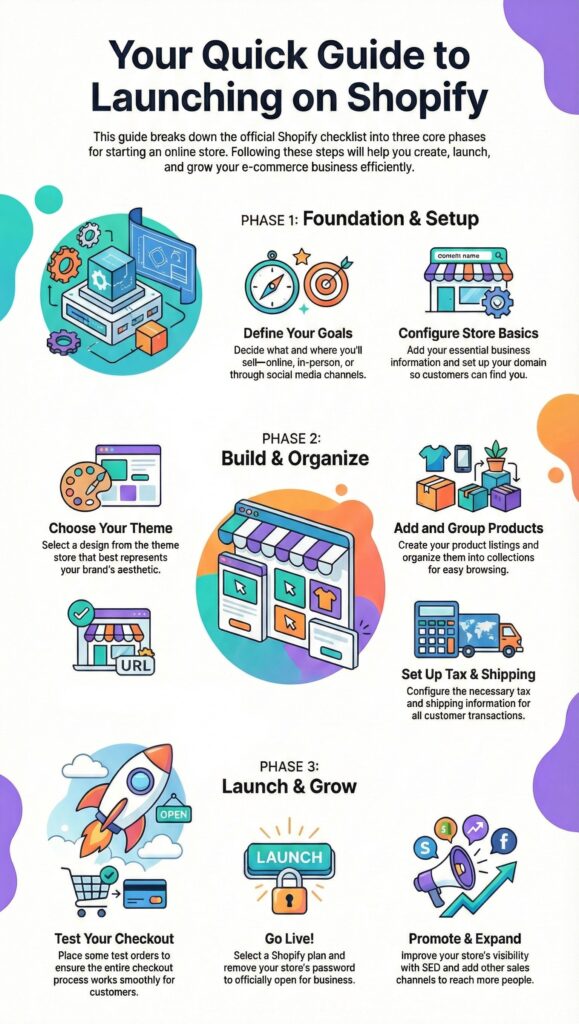
• Ask Basic Questions: Decide if you want to sell only online or also in person, and determine if you plan to sell through social media channels like Facebook.
• Pricing Plans: Start thinking about which pricing plan meets your needs, though you do not need to finalize this choice until the end of your free trial.
Phase 2: Set Up Your Online Store
This phase involves establishing the infrastructure of your business.
• Business Information: Enter the necessary information about yourself and your store.
• Standards and Domains: Decide on basic standards for customer transactions and product listings, and set up your domain to ensure customers can find you online.
• Business Settings: Ensure you configure your store management settings and email setup.
Note: If you are transitioning, or if you are selling in specific regions, there are specific additional requirements you should review.
Phase 3: Organize Your Online Store
The aesthetics and the products you sell are two of the most important parts of your store.
• Select a Theme: Try different themes to see which one best fits your brand aesthetics.
• Add Products: This is often the most time-consuming step. Give yourself plenty of time to add product listings and organize them into groups.
• Logistics: Set up necessary tax and shipping information.
Phase 4: Test Your Online Store
Never launch without a rehearsal.
• Place Test Orders: Before going live, place test orders to observe exactly how the checkout process works.
Phase 5: Open Your Online Store
Once you have picked a plan and tested the system, you are ready for the public.
• Remove the Password: Remove your online store password so visitors can access the site.
• Enable Communication: Add a chat widget to make it easier for visitors to ask questions.
Phase 6: Expand and Promote
The work doesn't stop at the launch.
• Add Sales Channels: After launching, you might benefit from adding other online sales channels via your Shopify admin. Be aware that eligibility for these channels depends on your region, product types, and subscription plan.
• SEO and Visibility: Add information used by search engines to improve visibility and promote your store in appropriate spaces.
Our Shopify Store Setup Service is a complete, done-for-you solution for founders, brands, and businesses ready to launch or level up with confidence. From strategy to structure, every detail is intentionally designed for performance, clarity, and growth.
Click here to learn more
